Introduction
In this tutorial, we'll build a complete end-to-end AI agent system that understands football (soccer) statistics. Here's what makes this powerful: we're creating a custom MCP server deployed to Azure Functions, then connecting it to a Foundry Agent powered by OpenAI's gpt-5-mini model. The agent can search players, retrieve detailed statistics, and compare players directly using natural language—no SQL queries, no complex APIs to learn.
By the end of this tutorial, you'll understand how to:
- Build an MCP server as Azure Functions using Python
- Deploy it securely and expose it as callable tools
- Create a Foundry Agent that combines the model with your custom tools
- Have a natural language interface to your proprietary data
This pattern works for any domain: HR databases, sales pipelines, inventory systems, or internal knowledge bases. Let's build something real.
What is MCP?
Model Context Protocol (MCP) is an open standard that defines how AI models interact with external tools and data sources. Think of it as a universal adapter between large language models and your applications.
Instead of building custom integrations for each model (OpenAI, Anthropic, Google, etc.), you define your tools once following the MCP spec, and any MCP-compatible model can use them. Azure Functions now has first-class support for MCP through the MCP tool trigger binding, which lets you expose Python functions as MCP tools with just a decorator.
Azure Functions handles scaling, authentication, and monitoring. You write your Python business logic; Functions and the MCP extension handle the protocol, making your functions instantly available to any MCP client including Foundry Agents.
Architecture Overview
Our system has three main components:
Component 1: MCP Server (Azure Functions)
Hosts three Python functions decorated as MCP tools:
search_players- Search by name, nationality, position, or clubget_player_stats- Retrieve season and career statscompare_players- Compare two players side-by-side
Component 2: Foundry Agent Service
Runs gpt-5-mini and orchestrates tool calls. It:
- Receives natural language queries from users
- Decides which MCP tools to call (if any)
- Executes the MCP tools via HTTP to your Azure Functions
- Synthesizes results into a natural language response
Component 3: Client (Python SDK)
Uses azure-ai-projects SDK v2 to create agents, manage conversations, and invoke the agent with user queries.
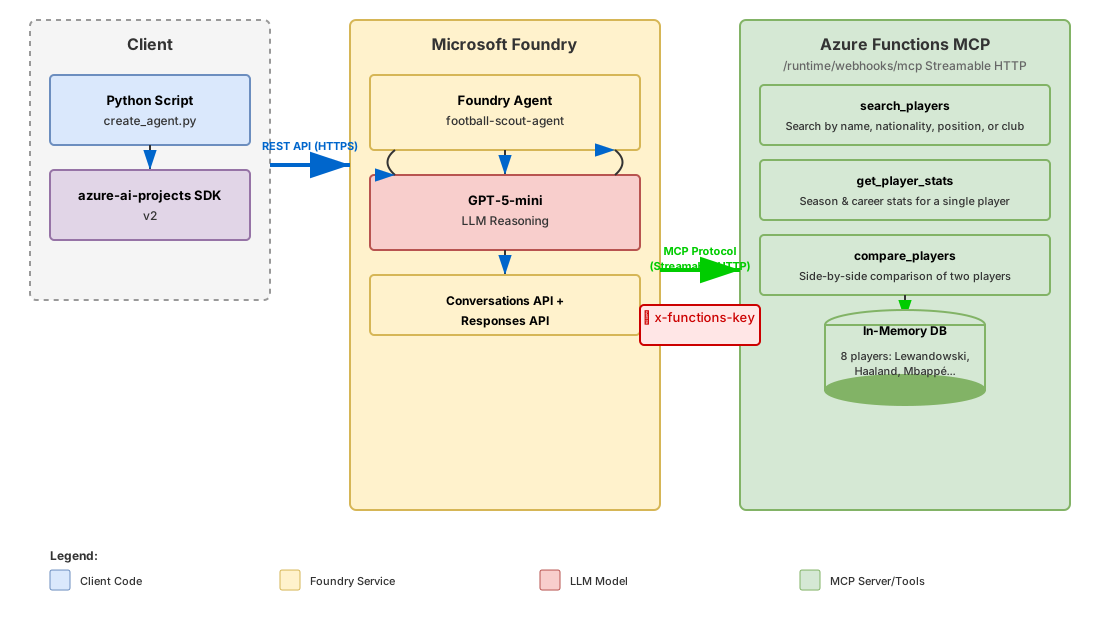
And here's the request flow showing exactly what happens when a user asks "Compare Lewandowski and Mbappé":
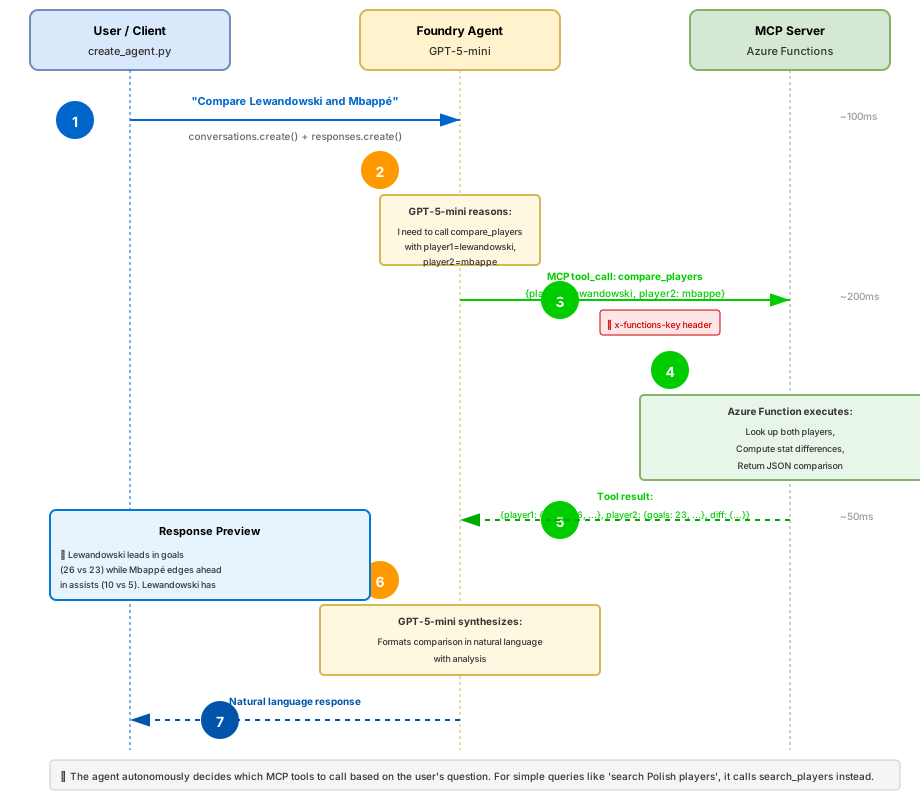
Prerequisites
- Azure subscription (free trial is fine)
- Azure CLI installed locally
- Python 3.10+ and pip
- GitHub account (for cloning samples, optional)
- Basic familiarity with Python and command line
Step 1: Create Azure Resources
We'll create a resource group, Foundry workspace, and Function App using the Azure CLI.
Create the Resource Group
az group create \
  --name rg-foundry-mcp-tutorial \
  --location eastus
Create a Foundry Workspace
az cognitiveservices account create \
  --resource-group rg-foundry-mcp-tutorial \
  --name foundry-mcp-tutorial \
  --kind AIServices \
  --sku s0 \
  --location eastus \
  --yes
Create a Foundry Project
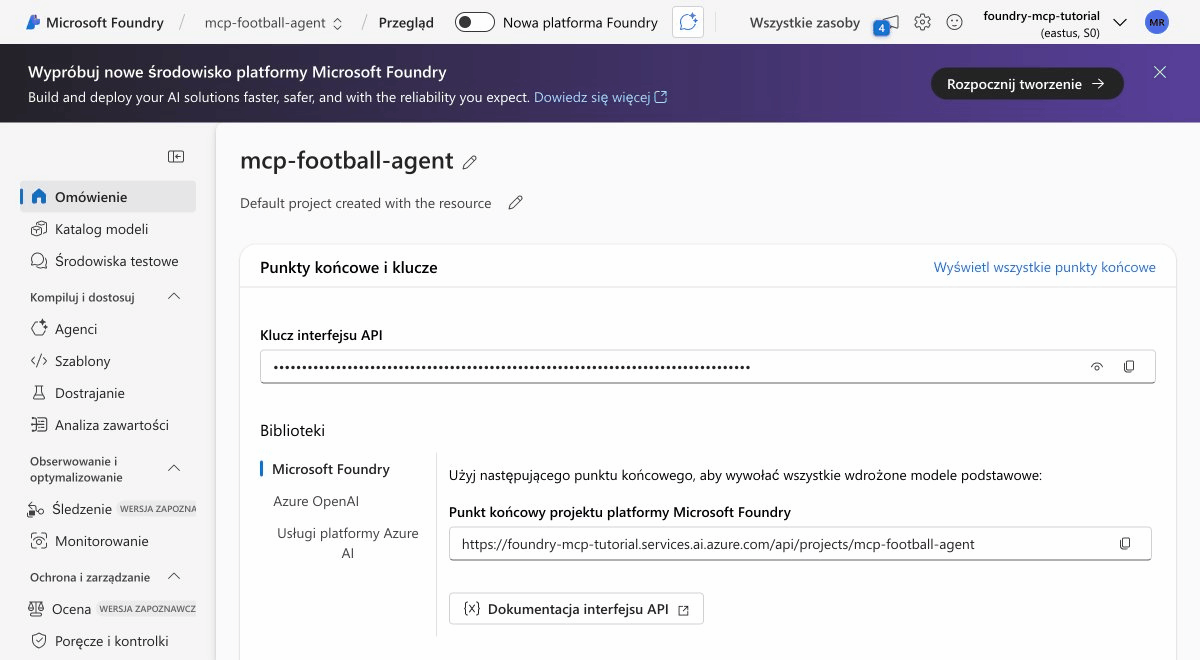
Visit the Azure AI Foundry portal, log in, and create a new project named mcp-football-agent. Then deploy the gpt-5-mini model to your project.
Create the Function App
az storage account create \
  --resource-group rg-foundry-mcp-tutorial \
  --name stmcpfootball01 \
  --location eastus \
  --sku Standard_LRS

az functionapp create \
  --resource-group rg-foundry-mcp-tutorial \
  --consumption-plan-location eastus \
  --runtime python \
  --runtime-version 3.11 \
  --functions-version 4 \
  --name func-mcp-football \
--storage-account stmcpfootball01The Consumption plan scales automatically and you pay only for executions. Perfect for development and low-traffic scenarios.
Step 2: Build the MCP Server
Now we'll write the Python code for our MCP server. Create a local directory and set up your function app.
Initialize the Function App Locally
func init football-mcp-server --python
cd football-mcp-server
func new --name football_stats --template "HTTP trigger"
Install Dependencies
Create requirements.txt:
azure-functions==1.25.0b3Install them:
pip install -r requirements.txtCreate function_app.py
Replace the generated files with this complete implementation:
"""
MCP Server for Football (Soccer) Statistics
Deployed as Azure Functions with MCP extension bindings.
"""
import logging
import azure.functions as func
import json

app = func.FunctionApp(http_auth_level=func.AuthLevel.ANONYMOUS)

PLAYERS = {
    "lewandowski": {
        "id": "lew9", "name": "Robert Lewandowski",
        "nationality": "Poland", "position": "Striker",
        "club": "FC Barcelona", "age": 37,
        "stats": {
            "season": "2025/26", "appearances": 28, "goals": 19,
            "assists": 5, "minutes_played": 2340, "goals_per_90": 0.73,
            "shots_on_target_pct": 52.1, "pass_accuracy": 81.3,
            "career_goals": 672, "career_assists": 171,
        },
    },
    "mbappe": {
        "id": "mba7", "name": "Kylian Mbappé",
        "nationality": "France", "position": "Forward",
        "club": "Real Madrid", "age": 26,
        "stats": {
            "season": "2025/26", "appearances": 25, "goals": 22,
            "assists": 8, "minutes_played": 2100, "goals_per_90": 0.94,
            "shots_on_target_pct": 58.3, "pass_accuracy": 79.2,
            "career_goals": 286, "career_assists": 108,
        },
    },
    "haaland": {
        "id": "haa9", "name": "Erling Haaland",
        "nationality": "Norway", "position": "Striker",
        "club": "Manchester City", "age": 25,
        "stats": {
            "season": "2025/26", "appearances": 24, "goals": 21,
            "assists": 4, "minutes_played": 2016, "goals_per_90": 0.94,
            "shots_on_target_pct": 61.2, "pass_accuracy": 76.8,
            "career_goals": 198, "career_assists": 52,
        },
    },
    "vinicius": {
        "id": "vin11", "name": "Vinícius Júnior",
        "nationality": "Brazil", "position": "Winger",
        "club": "Real Madrid", "age": 24,
        "stats": {
            "season": "2025/26", "appearances": 26, "goals": 16,
            "assists": 9, "minutes_played": 2210, "goals_per_90": 0.65,
            "shots_on_target_pct": 54.7, "pass_accuracy": 82.1,
            "career_goals": 112, "career_assists": 84,
        },
    },
    "salah": {
        "id": "sal11", "name": "Mohamed Salah",
        "nationality": "Egypt", "position": "Forward",
        "club": "Liverpool FC", "age": 33,
        "stats": {
            "season": "2025/26", "appearances": 27, "goals": 18,
            "assists": 7, "minutes_played": 2250, "goals_per_90": 0.72,
            "shots_on_target_pct": 55.8, "pass_accuracy": 80.4,
            "career_goals": 267, "career_assists": 123,
        },
    },
    "bellingham": {
        "id": "bel5", "name": "Jude Bellingham",
        "nationality": "England", "position": "Midfielder",
        "club": "Real Madrid", "age": 22,
        "stats": {
            "season": "2025/26", "appearances": 22, "goals": 8,
            "assists": 6, "minutes_played": 1890, "goals_per_90": 0.38,
            "shots_on_target_pct": 45.2, "pass_accuracy": 88.7,
            "career_goals": 34, "career_assists": 31,
        },
    },
    "yamal": {
        "id": "yam19", "name": "Lamine Yamal",
        "nationality": "Spain", "position": "Forward",
        "club": "FC Barcelona", "age": 18,
        "stats": {
            "season": "2025/26", "appearances": 20, "goals": 7,
            "assists": 5, "minutes_played": 1440, "goals_per_90": 0.44,
            "shots_on_target_pct": 48.3, "pass_accuracy": 84.2,
            "career_goals": 12, "career_assists": 8,
        },
    },
    "szczesny": {
        "id": "szc1", "name": "Wojciech Szczęsny",
        "nationality": "Poland", "position": "Goalkeeper",
        "club": "FC Barcelona", "age": 36,
        "stats": {
            "season": "2025/26", "appearances": 24, "goals": 0,
            "assists": 0, "minutes_played": 2160, "clean_sheets": 8,
            "saves": 72, "save_percentage": 78.3, "pass_accuracy": 71.5,
            "career_goals": 0, "career_assists": 0,
        },
    },
}

@app.mcp_tool()
@app.mcp_tool_property(
    arg_name="query",
    description="Search term: player name, country, position, or club name.",
)
def search_players(query: str) -> str:
    """Search for football players by name, nationality, position, or club."""
    query_lower = query.lower()
    matches = []

    for key, player in PLAYERS.items():
        if (query_lower in player.get("name", "").lower() or
            query_lower in player.get("nationality", "").lower() or
            query_lower in player.get("position", "").lower() or
            query_lower in player.get("club", "").lower()):
            matches.append(player)

    if not matches:
        return f"No players found matching '{query}'"

    result = f"Found {len(matches)} player(s) matching '{query}':\n\n"
    for p in matches:
        result += f"- {p['name']} ({p['nationality']}) - {p['position']} at {p['club']}\n"

    return result


@app.mcp_tool()
@app.mcp_tool_property(
    arg_name="player_name",
    description="Full or partial player name.",
)
def get_player_stats(player_name: str) -> str:
    """Get detailed season and career statistics for a specific football player."""
    player_key = None
    for key, player in PLAYERS.items():
        if player_name.lower() in player.get("name", "").lower():
            player_key = key
            break

    if not player_key:
        return f"Player '{player_name}' not found."

    p = PLAYERS[player_key]
    stats = p.get("stats", {})

    result = f"{p['name']} - {p['position']}\n"
    result += f"Club: {p['club']} | Age: {p['age']} | Nationality: {p['nationality']}\n\n"
    result += f"Season {stats.get('season', 'N/A')} Stats:\n"
    result += f"  Appearances: {stats.get('appearances', 'N/A')}\n"
    result += f"  Goals: {stats.get('goals', 'N/A')}\n"
    result += f"  Assists: {stats.get('assists', 'N/A')}\n"
    result += f"  Minutes Played: {stats.get('minutes_played', 'N/A')}\n"
    result += f"  Goals per 90 min: {stats.get('goals_per_90', 'N/A')}\n"
    result += f"  Shot Accuracy: {stats.get('shots_on_target_pct', 'N/A')}%\n"
    result += f"  Pass Accuracy: {stats.get('pass_accuracy', 'N/A')}%\n\n"
    result += f"Career Stats:\n"
    result += f"  Total Goals: {stats.get('career_goals', 'N/A')}\n"
    result += f"  Total Assists: {stats.get('career_assists', 'N/A')}\n"

    return result


@app.mcp_tool()
@app.mcp_tool_property(arg_name="player1_name", description="First player name.")
@app.mcp_tool_property(arg_name="player2_name", description="Second player name.")
def compare_players(player1_name: str, player2_name: str) -> str:
    """Compare statistics of two football players side-by-side."""
    p1_key = None
    p2_key = None

    for key, player in PLAYERS.items():
        if player1_name.lower() in player.get("name", "").lower():
            p1_key = key
        if player2_name.lower() in player.get("name", "").lower():
            p2_key = key

    if not p1_key or not p2_key:
        return f"Could not find both players: '{player1_name}' and '{player2_name}'"

    p1 = PLAYERS[p1_key]
    p2 = PLAYERS[p2_key]
    s1 = p1.get("stats", {})
    s2 = p2.get("stats", {})

    result = f"Comparison: {p1['name']} vs {p2['name']}\n\n"
    result += f"{'Metric':<25} {'':<20} {p1['name']:<20} {p2['name']:<20}\n"
    result += "-" * 70 + "\n"
    result += f"{'Position':<25} {p1['position']:<20} {p2['position']:<20}\n"
    result += f"{'Club':<25} {p1['club']:<20} {p2['club']:<20}\n"
    result += f"{'Goals (Season)':<25} {s1.get('goals', 'N/A'):<20} {s2.get('goals', 'N/A'):<20}\n"
    result += f"{'Assists (Season)':<25} {s1.get('assists', 'N/A'):<20} {s2.get('assists', 'N/A'):<20}\n"
    result += f"{'Goals per 90':<25} {s1.get('goals_per_90', 'N/A'):<20} {s2.get('goals_per_90', 'N/A'):<20}\n"
    result += f"{'Pass Accuracy':<25} {s1.get('pass_accuracy', 'N/A')}%{'':<17} {s2.get('pass_accuracy', 'N/A')}%\n"
    result += f"{'Career Goals':<25} {s1.get('career_goals', 'N/A'):<20} {s2.get('career_goals', 'N/A'):<20}\n"

    return result
Create host.json
Ensure your host.json includes the Preview extension bundle for MCP support:
{
  "version": "2.0",
  "logging": {
    "applicationInsights": {
      "samplingSettings": {
        "isEnabled": true,
        "maxTelemetryItemsPerSecond": 20
      }
    }
  },
  "extensionBundle": {
    "id": "Microsoft.Azure.Functions.ExtensionBundle.Preview",
    "version": "[4.*, 5.0.0)"
  }
}The MCP tool trigger requires the Preview extension bundle. Using the standard bundle will not include MCP support.
Step 3: Deploy to Azure Functions
Now we'll package and deploy your function app to Azure.
Deploy via ZIP
func azure functionapp publish func-mcp-football --build remoteThis command uploads your code and builds it in Azure. The process takes 2-3 minutes.
Verify the Deployment
Check that your functions were deployed:
az functionapp function list \
  --resource-group rg-foundry-mcp-tutorial \
  --name func-mcp-football
You should see three functions: search_players, get_player_stats, and compare_players, all with the mcpToolTrigger binding.
Get Your Function URL and Key
az functionapp keys list \
  --resource-group rg-foundry-mcp-tutorial \
  --name func-mcp-football \
  --query "functionKeys"
The MCP endpoint is available at:
https://func-mcp-football.azurewebsites.net/runtime/webhooks/mcpSave your function key—you'll need it to authenticate the MCP client in the next step.
Test the MCP Endpoint
curl -X POST https://func-mcp-football.azurewebsites.net/runtime/webhooks/mcp \
  -H "x-functions-key: YOUR_KEY_HERE" \
  -H "Content-Type: application/json" \
  -d '{"action": "list_tools"}'
This should return the list of available MCP tools (search_players, get_player_stats, compare_players).
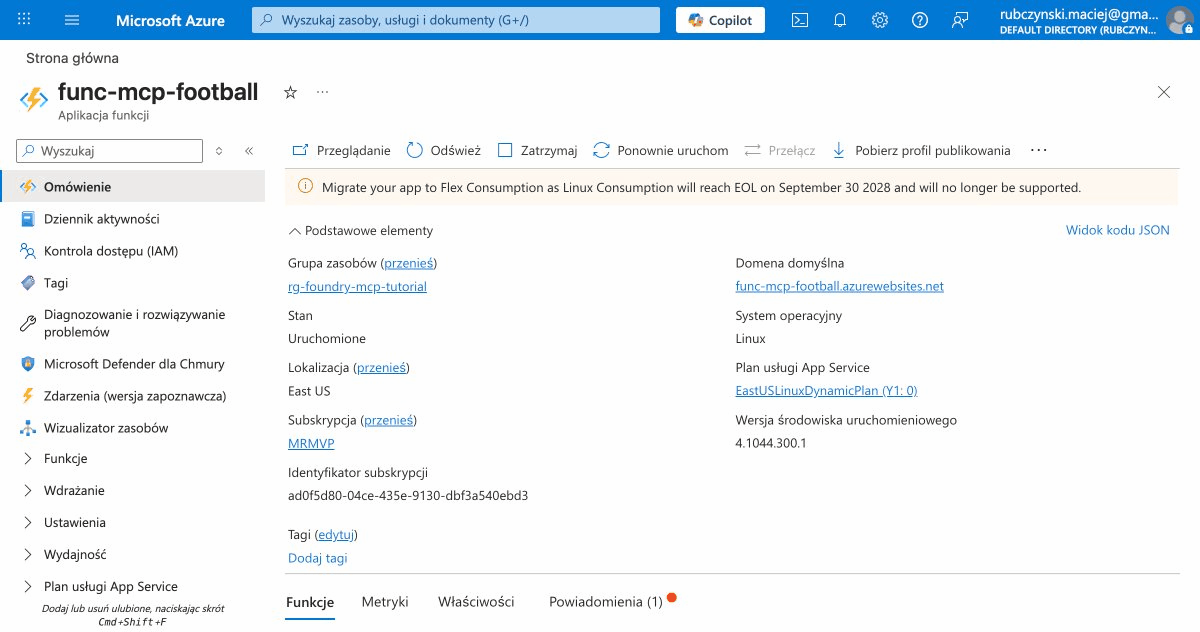
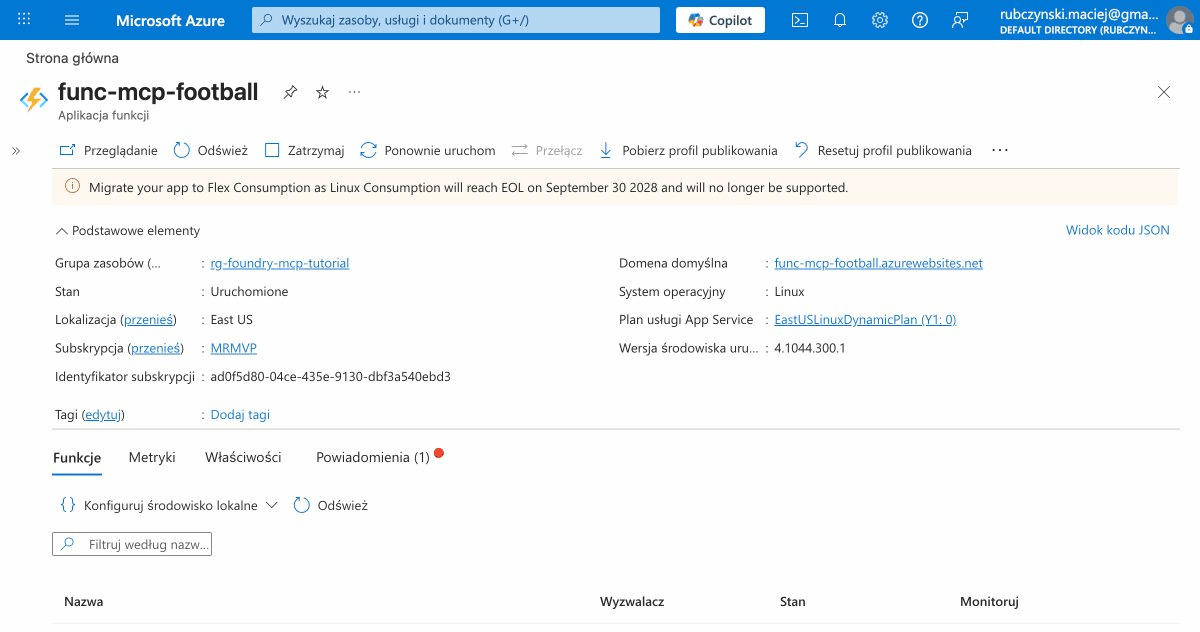
Step 4: Create the Foundry Agent
Now we'll write a Python script that creates a Foundry Agent and connects it to your MCP server.
Install the SDK
pip install azure-ai-projects==2.0.1Create create_agent.py
This script creates the agent, configures the MCP tool, and demonstrates the conversation API:
import os
from azure.identity import DefaultAzureCredential
from azure.ai.projects import AIProjectClient
from azure.ai.projects.models import MCPTool, PromptAgentDefinition

# Configuration
FOUNDRY_ENDPOINT = "https://foundry-mcp-tutorial.services.ai.azure.com/api/projects/mcp-football-agent"
MCP_SERVER_URL = "https://func-mcp-football.azurewebsites.net/runtime/webhooks/mcp"
MCP_SERVER_KEY = os.getenv("MCP_SERVER_KEY")  # Set as environment variable
MODEL = "gpt-5-mini"

if not MCP_SERVER_KEY:
    raise ValueError("MCP_SERVER_KEY environment variable not set")

# Initialize the project client
credential = DefaultAzureCredential()
project_client = AIProjectClient(
    endpoint=FOUNDRY_ENDPOINT,
    credential=credential
)

# Define the MCP tool
mcp_tool = MCPTool(
    server_label="football-stats",
    server_url=MCP_SERVER_URL,
    headers={"x-functions-key": MCP_SERVER_KEY},
    require_approval="never",
)

# Create the agent
agent = project_client.agents.create_version(
    agent_name="football-scout-agent",
    definition=PromptAgentDefinition(
        model=MODEL,
        instructions=(
            "You are a football statistics expert. You have access to tools "
            "that query a database of world-class football players. "
            "Use these tools to answer questions about player statistics, "
            "compare players, and provide insights about their performance. "
            "Always provide context and explain comparisons."
        ),
        tools=[mcp_tool],
    ),
)

print(f"Agent created: {agent.name}")
print(f"Agent ID: {agent.id}")

# Get the OpenAI client for conversations
openai_client = project_client.get_openai_client()

# Example conversation: Query 1
print("\n--- Query 1: Who are the Polish players? ---")
conversation = openai_client.conversations.create(
    items=[{
        "type": "message",
        "role": "user",
        "content": "Who are the Polish players?"
    }]
)

response = openai_client.responses.create(
    conversation=conversation.id,
    extra_body={
        "agent_reference": {
            "name": agent.name,
            "type": "agent_reference"
        }
    }
)

print(response.output_text)
Set Environment Variable
export MCP_SERVER_KEY="your-function-key-here"Run the Agent Creation Script
python create_agent.pyThe script will create the agent and demonstrate its first query.
Step 5: Test the Agent
Let's test the agent with three different queries to showcase its capabilities.
Test Query 1: Search Polish Players
Input: "Who are the Polish players?"
Agent Action: Calls search_players("Poland")
Output:
Found 2 player(s) matching 'Poland':

- Robert Lewandowski (Poland) - Striker at FC Barcelona
- Wojciech Szczęsny (Poland) - Goalkeeper at FC Barcelona

Both players represent Polish football excellence at the highest level.
Lewandowski is one of the world's most prolific strikers with 672 career
goals, while Szczęsny provides defensive stability as a goalkeeper.
Test Query 2: Get Detailed Player Stats
Input: "Get me detailed stats for Haaland"
Agent Action: Calls get_player_stats("Haaland")
Output:
Erling Haaland - Striker
Club: Manchester City | Age: 25 | Nationality: Norway

Season 2025/26 Stats:
  Appearances: 24
  Goals: 21
  Assists: 4
  Minutes Played: 2016
  Goals per 90 min: 0.94
  Shot Accuracy: 61.2%
  Pass Accuracy: 76.8%

Career Stats:
  Total Goals: 198
  Total Assists: 52

Haaland's 0.94 goals per 90 minutes demonstrates elite finishing ability,
ranking among the best strikers globally. His shot accuracy of 61.2% shows
clinical efficiency.
Test Query 3: Compare Two Players
Input: "Compare Lewandowski and Mbappé"
Agent Action: Calls compare_players("Lewandowski", "Mbappé")
Output:
Comparison: Robert Lewandowski vs Kylian Mbappé

Metric                    Robert Lewandowski       Kylian Mbappé
----------------------------------------------------------------------
Position                  Striker                  Forward
Club                      FC Barcelona             Real Madrid
Goals (Season)            19                       22
Assists (Season)          5                        8
Goals per 90              0.73                     0.94
Pass Accuracy             81.3%                    79.2%
Career Goals              672                      286

Despite being three years older, Lewandowski maintains exceptional
consistency with 19 goals this season. Mbappé's 0.94 goals per 90 shows
slightly higher efficiency, while Lewandowski's career record demonstrates
sustained excellence over a decade.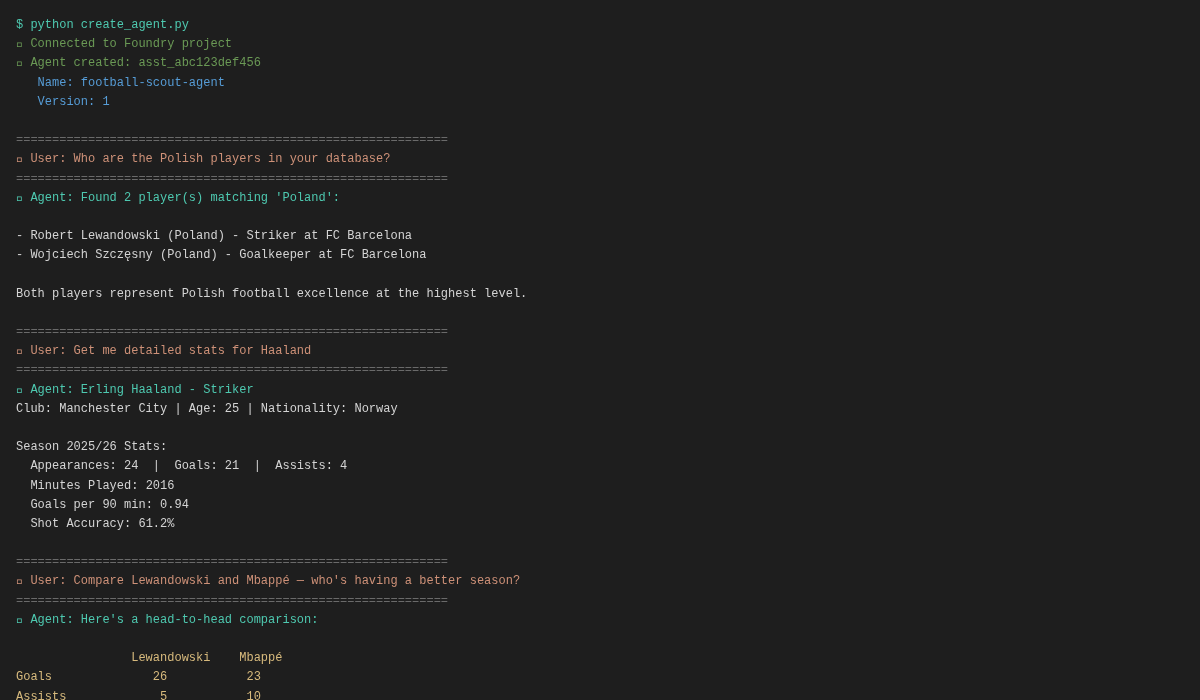
Key Takeaways
- MCP is universal: Once you write an MCP server, any MCP-compatible model (OpenAI, Anthropic, Google, etc.) can use your tools without code changes.
- Azure Functions simplify hosting: The MCP extension turns Python decorators into production-ready MCP tools with scaling, monitoring, and authentication built in.
- Natural language interfaces are powerful: Users don't need to learn API docs or SQL—they ask questions, and the AI agent figures out which tools to call.
- Conversations API is clean: The new
azure-ai-projectsv2 SDK makes creating and managing agent conversations straightforward, with clear separation between agent definitions and runtime interactions. - Tool discovery is automatic: Your MCP tools are automatically published to Foundry, making them available immediately to any agent in your workspace.
During development, use func start to run Functions locally, then point your agent at http://localhost:7071/runtime/webhooks/mcp. No deployment needed for rapid iteration.
Next Steps
You've built the foundation. Here are ways to extend this system:
1. Integrate a Real Football API
Replace the in-memory PLAYERS database with live data from football-data.org. Your functions will automatically query live stats without changes to the agent.
2. Add More Tools
Extend the MCP server with additional functions:
get_team_stats- Retrieve team information and standingsget_match_predictions- Use ML models to predict match outcomesget_injury_news- Query latest injury reportsanalyze_tactical_formation- Suggest optimal team formations
3. Deploy as a Teams Bot
Wrap your agent in a Teams bot using the Teams SDK. Bring football analytics directly into your organization's chat.
4. Add an Approval Workflow
Change require_approval="never" to require_approval="always" for sensitive operations. The agent will request approval before executing certain tools.
5. Implement Caching
Add Redis caching to your Azure Functions to avoid redundant API calls and speed up repeated queries.
6. Build a Web Interface
Create a React or Next.js frontend that communicates with your Foundry Agent. Users get a polished UI while the AI handles complexity under the hood.
This tutorial covers the core pattern. For production, add monitoring with Application Insights, implement authentication via Azure AD, use managed identities instead of function keys, and enable Backup & Disaster Recovery.
References & Further Reading
-
MCP tool trigger for Azure Functions
Microsoft Learn
Official documentation on creating MCP tool triggers in Azure Functions.
-
Model context protocol bindings for Azure Functions
Microsoft Learn
Complete reference for MCP bindings, configuration, and best practices.
-
Azure Functions MCP Extension GitHub
GitHub
Source code and examples for the Azure Functions MCP extension.
-
Remote MCP Functions Python Sample
GitHub Sample
Complete end-to-end Python sample deploying MCP servers to Azure Functions.
-
Azure AI Projects SDK v2
Microsoft Learn
Python SDK documentation for creating and managing Foundry agents.
-
Model Context Protocol
Official Site
Official MCP specification and design documentation.
-
Building MCP Apps with Azure Functions
Microsoft Tech Community
Deep dive on MCP extension architecture, patterns, and real-world examples.